使用python怎么將視頻轉(zhuǎn)換為全字符視頻-創(chuàng)新互聯(lián)
這篇文章主要介紹了使用python怎么將視頻轉(zhuǎn)換為全字符視頻,創(chuàng)新互聯(lián)小編覺得不錯(cuò),現(xiàn)在分享給大家,也給大家做個(gè)參考,一起跟隨創(chuàng)新互聯(lián)小編來看看吧!

Python主要應(yīng)用于:1、Web開發(fā);2、數(shù)據(jù)科學(xué)研究;3、網(wǎng)絡(luò)爬蟲;4、嵌入式應(yīng)用開發(fā);5、游戲開發(fā);6、桌面應(yīng)用開發(fā)。
代碼:
#-*- coding:utf-8 -*-
import argparse
import os
import cv2
import subprocess
from cv2 import VideoWriter,VideoWriter_fourcc,imread,resize
from PIL import Image, ImageFont, ImageDraw
#命令行輸入?yún)?shù)處理
parser = argparse.ArgumentParser()
parser.add_argument('file')
parser.add_argument('-o','--output')
parser.add_argument('-f','--fps',type = float, default = 24)#幀
parser.add_argument('-s','--save',type = bool, nargs='?', default = False, const = True)
#是否保留Cache文件,默認(rèn)不保存
#獲取參數(shù)
args = parser.parse_args()
INPUT = args.file
OUTPUT = args.output
SAVE = args.save
FPS = args.fps
#像素對(duì)應(yīng)ascii碼
ascii_char = list("$@B%8&WM#*oahkbdpqwmZO0QLCJUYXzcvunxrjft/\|()1{}[]?-_+~<>i!lI;:oa+>!:+. ")
#ascii_char = list("MNHQ$OC67+>!:-. ")
#ascii_char = list("MNHQ$OC67)oa+>!:+. ")
#將像素轉(zhuǎn)換為ascii碼
def get_char(r,g,b,alpha = 256):
if alpha == 0:
return ''
length = len(ascii_char)
gray = int(0.2126 * r + 0.7152 * g + 0.0722 * b)
unit = (256.0+1)/length
return ascii_char[int(gray/unit)]
#將txt轉(zhuǎn)換為圖片
def txt2image(file_name):
im = Image.open(file_name).convert('RGB')
#gif拆分后的圖像,需要轉(zhuǎn)換,否則報(bào)錯(cuò),由于gif分割后保存的是索引顏色
raw_width = im.width
raw_height = im.height
width = int(raw_width/6)
height = int(raw_height/15)
im = im.resize((width,height),Image.NEAREST)
txt=""
colors = []
for i in range(height):
for j in range(width):
pixel = im.getpixel((j,i))
colors.append((pixel[0],pixel[1],pixel[2]))
if(len(pixel) == 4):
txt += get_char(pixel[0],pixel[1],pixel[2],pixel[3])
else:
txt += get_char(pixel[0],pixel[1],pixel[2])
txt += '\n'
colors.append((255,255,255))
im_txt = Image.new("RGB",(raw_width,raw_height),(255,255,255))
dr = ImageDraw.Draw(im_txt)
#font = ImageFont.truetype(os.path.join("fonts","漢儀楷體簡.ttf"),18)
font=ImageFont.load_default().font
x=y=0
#獲取字體的寬高
font_w,font_h=font.getsize(txt[1])
font_h *= 1.37 #調(diào)整后更佳
#ImageDraw為每個(gè)ascii碼進(jìn)行上色
for i in range(len(txt)):
if(txt[i]=='\n'):
x+=font_h
y=-font_w
dr.text((y,x),txt[i],font = font, fill = colors[i])
y+=font_w
name = file_name
print(name+' changed')
im_txt.save(name)
#將視頻拆分成圖片
def video2txt_jpg(file_name):
vc = cv2.VideoCapture(file_name)
c=1
if vc.isOpened():
r,frame = vc.read()
if not os.path.exists('Cache'):
os.mkdir('Cache')
os.chdir('Cache')
else:
r = False
while r:
cv2.imwrite(str(c)+'.jpg',frame)
txt2image(str(c)+'.jpg')#同時(shí)轉(zhuǎn)換為ascii圖
r,frame = vc.read()
c += 1
os.chdir('..')
return vc
#將圖片合成視頻
def jpg2video(outfile_name,fps):
fourcc = VideoWriter_fourcc(*"MJPG")
images = os.listdir('Cache')
im = Image.open('Cache/'+images[0])
vw = cv2.VideoWriter(outfile_name+'.avi',fourcc,fps,im.size)
os.chdir('Cache')
for image in range(len(images)):
#Image.open(str(image)+'.jpg').convert("RGB").save(str(image)+'.jpg')
frame = cv2.imread(str(image+1)+'.jpg')
vw.write(frame)
print(str(image+1)+'.jpg'+' finished')
os.chdir('..')
vw.release()
#遞歸刪除目錄
def remove_dir(path):
if os.path.exists(path):
if os.path.isdir(path):
dirs = os.listdir(path)
for d in dirs:
if os.path.isdir(path+'/'+d):
remove_dir(path+'/'+d)
elif os.path.isfile(path+'/'+d):
os.remove(path+'/'+d)
os.rmdir(path)
return
elif os.path.isfile(path):
os.remove(path)
return
#調(diào)用ffmpeg獲取mp3音頻文件
def video2mp3(file_name):
outfile_name = file_name.split('.')[0]+'.mp3'
subprocess.call('ffmpeg -i '+file_name+' -f mp3 '+outfile_name,shell = True)
#合成音頻和視頻文件
def video_add_mp3(file_name,mp3_file):
outfile_name = file_name.split('.')[0]+'-txt.mp4'
subprocess.call('ffmpeg -i '+file_name+' -i '+mp3_file+' -strict -2 -f mp4 '+outfile_name,shell = True)
if __name__=='__main__':
vc = video2txt_jpg(INPUT)
FPS = vc.get(cv2.CAP_PROP_FPS)#獲取幀率
vc.release()
jpg2video(INPUT.split('.')[0],FPS)
print(INPUT,INPUT.split('.')[0]+'.mp3')
video2mp3(INPUT)
video_add_mp3(INPUT.split('.')[0]+'.avi',INPUT.split('.')[0]+'.mp3')
if(not SAVE):
remove_dir("Cache")
os.remove(INPUT.split('.')[0]+'.mp3')
os.remove(INPUT.split('.')[0]+'.avi')流程圖
這次python編程的流程圖如下:
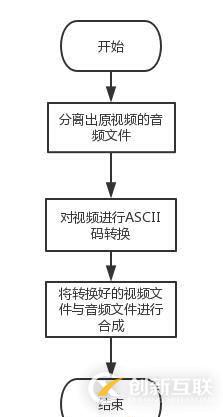
以上就是創(chuàng)新互聯(lián)小編為大家收集整理的使用python怎么將視頻轉(zhuǎn)換為全字符視頻,如何覺得創(chuàng)新互聯(lián)網(wǎng)站的內(nèi)容還不錯(cuò),歡迎將創(chuàng)新互聯(lián)網(wǎng)站推薦給身邊好友。
本文名稱:使用python怎么將視頻轉(zhuǎn)換為全字符視頻-創(chuàng)新互聯(lián)
網(wǎng)站路徑:http://www.jbt999.com/article40/diecho.html
成都網(wǎng)站建設(shè)公司_創(chuàng)新互聯(lián),為您提供做網(wǎng)站、網(wǎng)站導(dǎo)航、虛擬主機(jī)、域名注冊(cè)、網(wǎng)站營銷、關(guān)鍵詞優(yōu)化
聲明:本網(wǎng)站發(fā)布的內(nèi)容(圖片、視頻和文字)以用戶投稿、用戶轉(zhuǎn)載內(nèi)容為主,如果涉及侵權(quán)請(qǐng)盡快告知,我們將會(huì)在第一時(shí)間刪除。文章觀點(diǎn)不代表本網(wǎng)站立場,如需處理請(qǐng)聯(lián)系客服。電話:028-86922220;郵箱:[email protected]。內(nèi)容未經(jīng)允許不得轉(zhuǎn)載,或轉(zhuǎn)載時(shí)需注明來源: 創(chuàng)新互聯(lián)
猜你還喜歡下面的內(nèi)容
- ie手法四大原則ie四大原則是什么?-創(chuàng)新互聯(lián)
- 12cR2_AWR相關(guān)參數(shù)設(shè)置-創(chuàng)新互聯(lián)
- java如何判斷對(duì)象是否為null-創(chuàng)新互聯(lián)
- Python中數(shù)據(jù)庫Connection和Cursor對(duì)象的示例分析-創(chuàng)新互聯(lián)
- MySQL中事務(wù)是什么意思-創(chuàng)新互聯(lián)
- python實(shí)現(xiàn)人和電腦猜拳的示例代碼-創(chuàng)新互聯(lián)
- 如何在PHP中避免使用同名變量-創(chuàng)新互聯(lián)

- 什么是借勢營銷?如何借勢才能更有效? 2022-06-19
- 企業(yè)網(wǎng)站建設(shè)選擇外包建站公司的好處——?jiǎng)?chuàng)新互聯(lián) 2021-04-21
- 不一樣的建站公司為什么建站價(jià)格會(huì)差很多 2022-11-10
- 準(zhǔn)備好建站需求,再尋找建站公司 2017-02-02
- 判斷一家建站公司是否可靠的四要素 2022-09-02
- 上海建站公司與企業(yè)的關(guān)系 2020-11-10
- 北京建站公司_高端網(wǎng)站建設(shè) 2021-04-15
- 廣州專業(yè)建站公司:網(wǎng)站的重要性 2021-11-17
- 挑選專業(yè)建站公司需要注意的三要素 2022-08-15
- 網(wǎng)站進(jìn)行SEO優(yōu)化前必須分析的兩大塊 2022-05-24
- 信陽網(wǎng)絡(luò)公司:如何選擇高性價(jià)比的建站公司? 2021-11-21
- 成都網(wǎng)站建設(shè)選擇高端建站公司應(yīng)該避免什么陷阱? 2022-05-25